
AI Pipelines: How I Built Systems That Work While I Sleep
Most people use AI to generate code, write copy, or fix their lives in a thousand small ways. You feed it something, it spits back something better or more structured. That’s fine. That’s the obvious use case. But one of the highest-value applications I’ve found for AI is building pipelines, specifically with Claude.
Claude is built for this. The model has a strong orientation toward multi-step workflows, tool use, and persistent context. And while there are other capable models out there, including some surprisingly good Chinese models, I’m going to focus on what I’ve actually been experimenting with. The results speak for themselves.
What Is a Pipeline, Anyway?
Before I show you what I built, let’s establish what I mean by “pipeline”, because the word gets thrown around a lot and it helps to be precise.
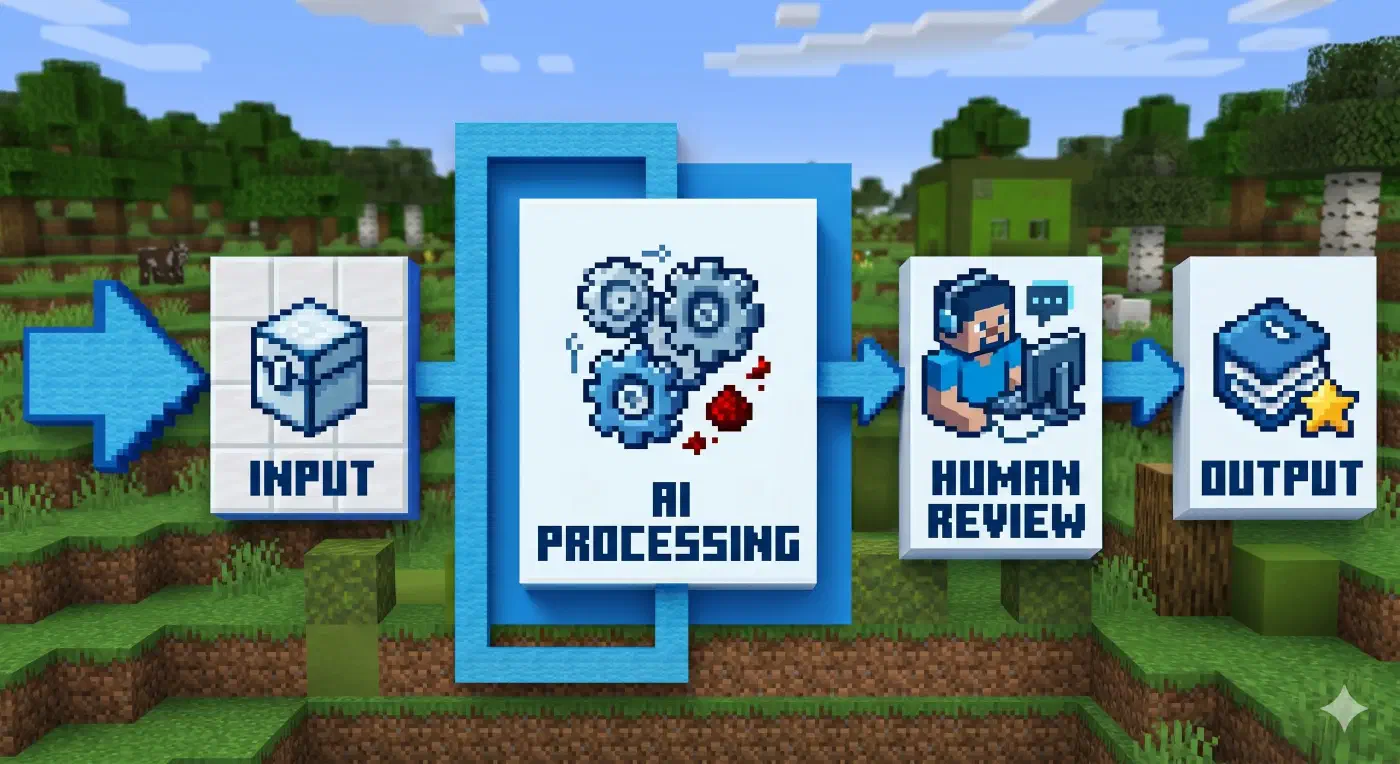
A pipeline is a sequence of processing stages where each stage transforms input data and passes the result to the next stage. Think of an oil refinery: crude oil goes in one end, and through a series of chemical and physical processes, you get gasoline, diesel, and other products at the other end. Each stage has a specific job. None of them could do the whole job alone, but together they produce something valuable.
In software, pipelines are everywhere. CI/CD pipelines take your code, run tests, check style, build artifacts, and deploy, each step succeeding only if the previous one passed. Data pipelines take raw data from multiple sources, clean it, transform it, and load it into a data warehouse for analysis.
The key properties of any pipeline:
- It has defined stages. Each stage does a specific thing.
- Output of one stage becomes input to the next. The stages are chained.
- It can run repeatedly. Same input structure, same process, same output quality.
- It is automated. Once you set it up, it runs without you babysitting every step.
Now, what happens when you add AI to a pipeline? You gain the ability to handle fuzzy stages, steps where the right answer is not predetermined, where you need judgment, synthesis, or adaptation. Traditional pipelines break when the input is ambiguous. AI-augmented pipelines can handle messy, real-world data and still produce consistent results.
The Four Pieces You Need to Build an AI Pipeline
Before you can build anything, you need four components working together:
1. A trigger. Something that starts the pipeline. This could be a cron job running twice a day, a file landing in a folder, a webhook firing, or you manually invoking it when you need it.
2. An input. The data the pipeline processes. This could be a CSV from a scraper, a list of URLs, a folder full of notes, or an API response. The key is that the input has structure, even if it is messy, there is a pattern you can parse.
3. AI agents that do the processing. This is where Claude (or your model of choice) lives. Each agent has a specific role: extract data, evaluate quality, rewrite content, classify information, generate output. The agents can use tools, reading files, browsing URLs, running code, writing to databases.
4. An output destination. Where the processed result lands. This could be a database, a PDF, an email, a Notion page, a LinkedIn post queue, or a folder on your computer.
That’s the entire architecture. Everything I’ve built follows this pattern. Let me show you how it plays out in practice.
1. Where It Started: CareerOps and the Job Search Pipeline
Everything began when I discovered CareerOps, a repository created by Santiago, a developer who was trying to break into data engineering. He noticed that everyone was using AI to read reports and then ignoring them, so he decided to fight fire with fire. The repo has 44,100 stars and ~9,300 forks on GitHub. It takes any AI coding CLI (Claude Code, OpenCode, or Gemini CLI) and turns it into a job search command center. Instead of manually tracking every application, you feed it data and it runs an AI pipeline that finds what you need.
My workflow was slightly modified. I did not use CareerOps for the initial job scraping. Instead, I fed it a CSV generated by JobsSpy, a scraper I had already optimized to pull 200-300 job listings across multiple regions. I was targeting US and Canadian positions specifically, because that is where compensation is most competitive. Combined with networking and a strategic application approach, I landed a role at a company I am very happy with. The pipeline worked.
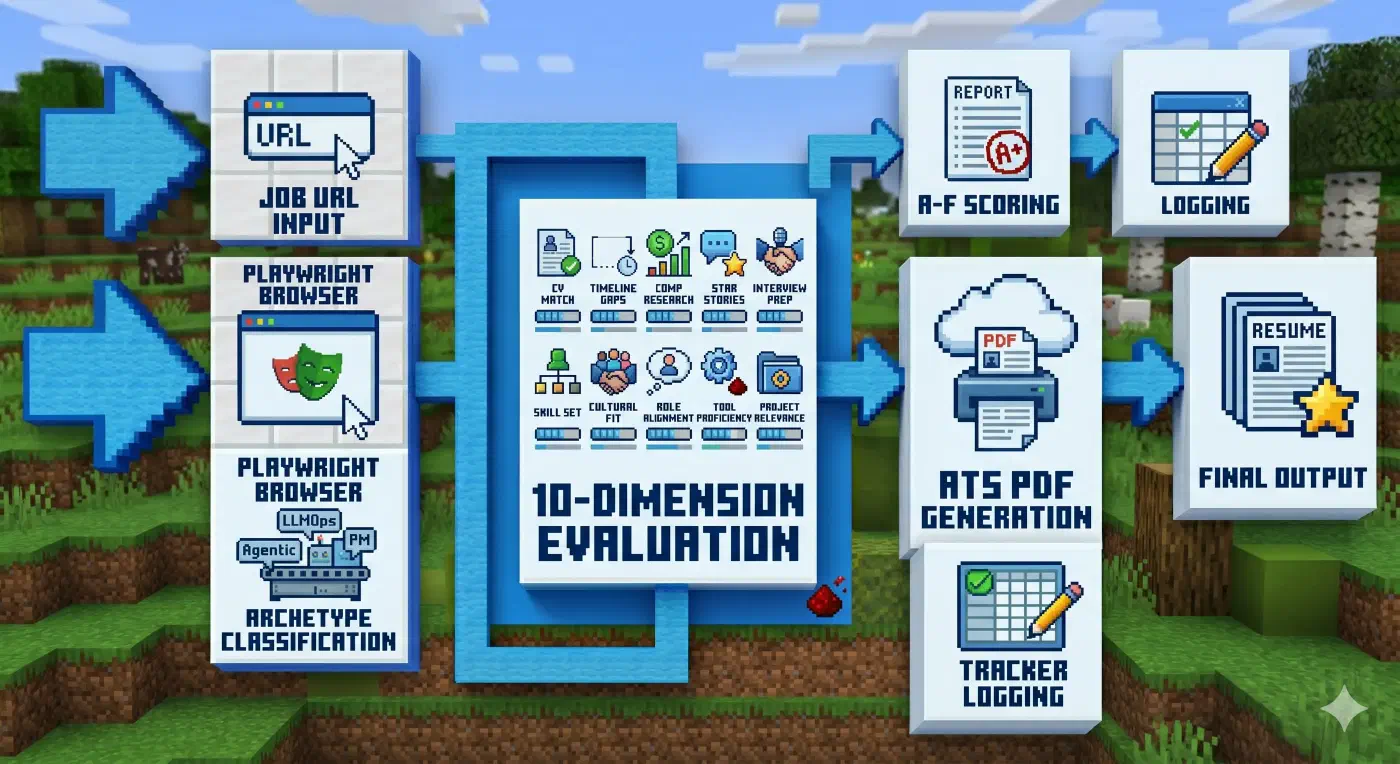
Here’s how it works in practice: paste a job URL, and CareerOps runs the full evaluation pipeline, scoring the role from A to F across 10 weighted dimensions (CV match, compensation research, level strategy, interview prep, and more), generating an ATS-optimized PDF tailored to that specific listing, and logging it to a tracker. For UX designers and vibe coders specifically: it reads the actual job description page via Playwright, understands what the role really needs, and adapts your CV for it, not keyword stuffing, but actual alignment. Santiago used it to evaluate 740+ job listings, generate 100+ tailored CVs, and land a Head of Applied AI role.
From there, I’d request the full ranked list and work from best to worst, one application at a time. The system would generate ATS-optimized PDFs tailored to each specific job description. You could run this in batches, spawning sub-agents to handle multiple applications concurrently. The result was a kind of source of truth, a systematic approach that converted 300 raw listings into around 30 focused applications per day, run entirely without manual intervention.
The pipeline stages when you paste a job URL:
- Input: Job URL pasted to the CLI
- Stage 1: Playwright opens the posting, reads the full job description
- Stage 2: Classifies the role archetype (LLMOps, Agentic, PM, SA, FDE, Transformation)
- Stage 3: Evaluates across 10 weighted dimensions: CV match, gaps, comp research, STAR stories, interview prep
- Stage 4: Scores from A to F, outputs a written evaluation report
- Stage 5: Generates ATS-optimized PDF tailored to that specific job description
- Stage 6: Logs to tracker (TSV file, your source of truth)
- Output: Evaluation report + PDF + tracker entry
[!warning] CareerOps is token-heavy. Running the full auto-pipeline on a single job URL, evaluate + PDF generation + tracker log, consumes a significant chunk of a session. On my $100/month subscription, one session burned through roughly 1 of my 5 daily sessions. For a batch of 10 URLs running in parallel via sub-agents, the token consumption goes up fast. I would not run this on a $20/month plan. The ROI is real, but so is the burn rate. Start with a single URL and watch your counter.
[!important] On model choice: I have not used Chinese models for this pipeline specifically, but I would recommend trying them on OpenCode. As of today (5/11/2026), DeepSeek 4 Flash is free there. For a token-hungry pipeline like CareerOps, a free capable model changes the math entirely.
[!info] High-scoring positions were typically from tier-one companies with location restrictions (US or Canada only), which made direct application difficult. The pipeline helped me identify these upfront rather than wasting time on rejected applications.
2. CareerOps Under the Hood: Skills All the Way Down
CareerOps is impressive, but simpler than it looks. It is fundamentally a collection of 14 skill modes: things like /career-ops (full auto-pipeline), /career-ops-evaluate (single role evaluation), /career-ops-scan (portal scanner for 45+ companies), /career-ops-pdf (PDF generation), /career-ops-batch (parallel evaluation with sub-agents), and more. Each mode handles a specific subprocess. Together they cover the full job search workflow.
I ended up forking it to build a networking-focused version. My goal was to reach decision-makers and hiring leads directly, offer services, and build genuine relationships in the industry. Because at the end of the day, networking is about making friends in your field, not just making money.
3. The Content Pipeline: From X to LinkedIn Carousel
After the job search win, I decided to build more pipelines. If you follow me on LinkedIn, you’ll see a recurring theme: content about AI. That content doesn’t write itself. It’s the product of a pipeline I built to surface the best information and turn it into posts.
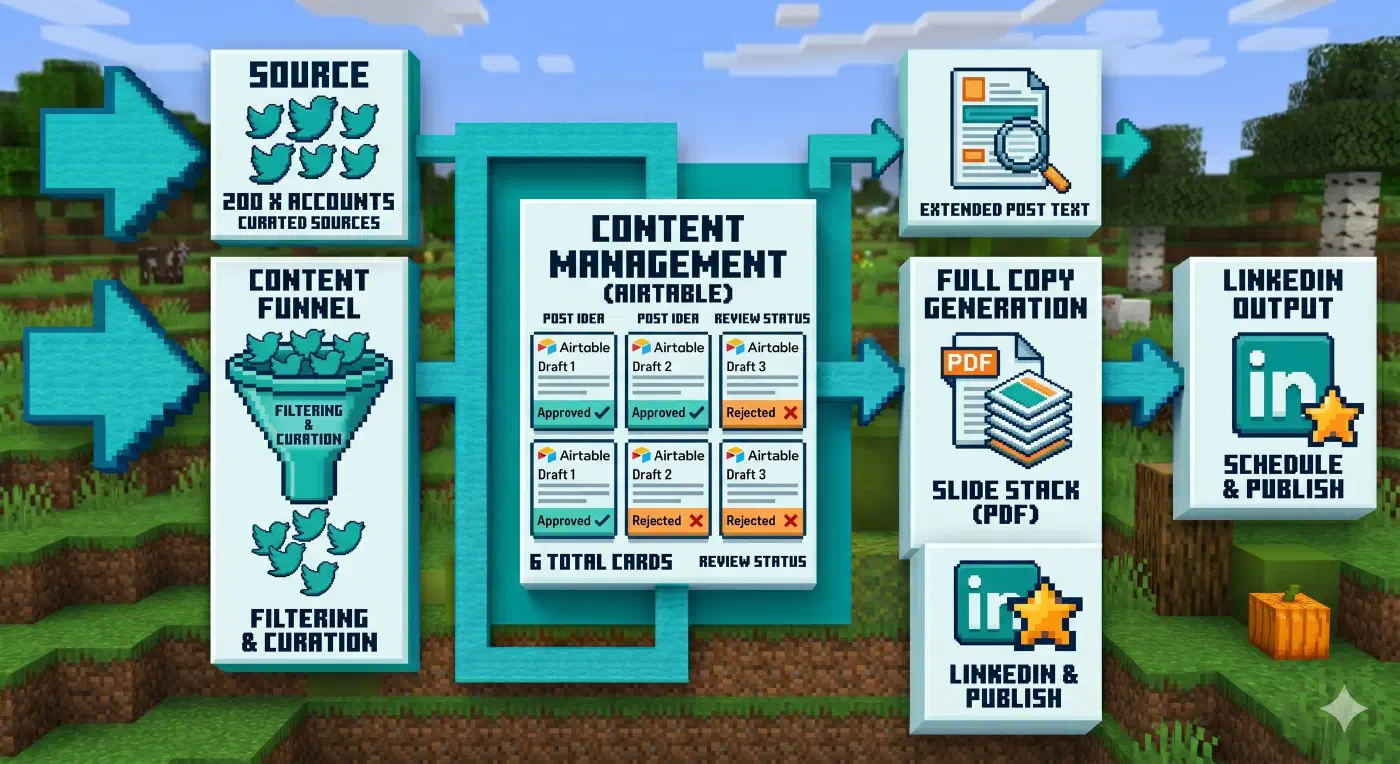
The problem with naive AI content curation is AI slop. Ask an AI for “the latest AI news” and it will pull from Google results that are a month old, presented as fresh. The model does not know Google results are stale; it trusts the search output. To fix this, I gave my system my full list of followed accounts on X (around 200). The pipeline checks those accounts for relevant shares, especially repo announcements. When it finds something interesting, it visits the repo directly and cross-references the claims before including them.
All validated content flows into an Airtable base I maintain with source URLs and a logline for each item. I review the queue and tag each entry: approved, irrelevant (so the system learns my preferences), not approved, or “too old.” Approved items get a more extensive copy treatment from Claude. I always add my own voice to it. AI copy is good, but it needs seasoning. That is my job in the pipeline.
Once everything is approved, a Python script generates a PDF per post, uploads it to Airtable, and it is ready to be posted as a carousel on LinkedIn. I ran this for a week as a test. It was effective. I do not auto-post. I paste manually to LinkedIn so I retain control over timing and final edits.
The pipeline stages, broken down:
- Trigger: Twice daily, or manually invoked
- Input: List of 200 X accounts I follow
- Stage 1: Pull latest posts from those accounts
- Stage 2: Filter for relevant AI/tech content (repo shares, articles, tools)
- Stage 3: For each candidate, visit the shared URL and cross-reference claims
- Stage 4: Write logline and store in Airtable with approval status
- Stage 5: My manual review (approve/reject tag)
- Stage 6: Claude generates extended copy for approved items
- Stage 7: I add personal voice and final edits
- Stage 8: Python script generates PDF, uploads to Airtable
- Output: PDF carousel ready for LinkedIn upload
4. My Obsidian Inbox Pipeline
Then I went further and built a pipeline for my Obsidian knowledge base.
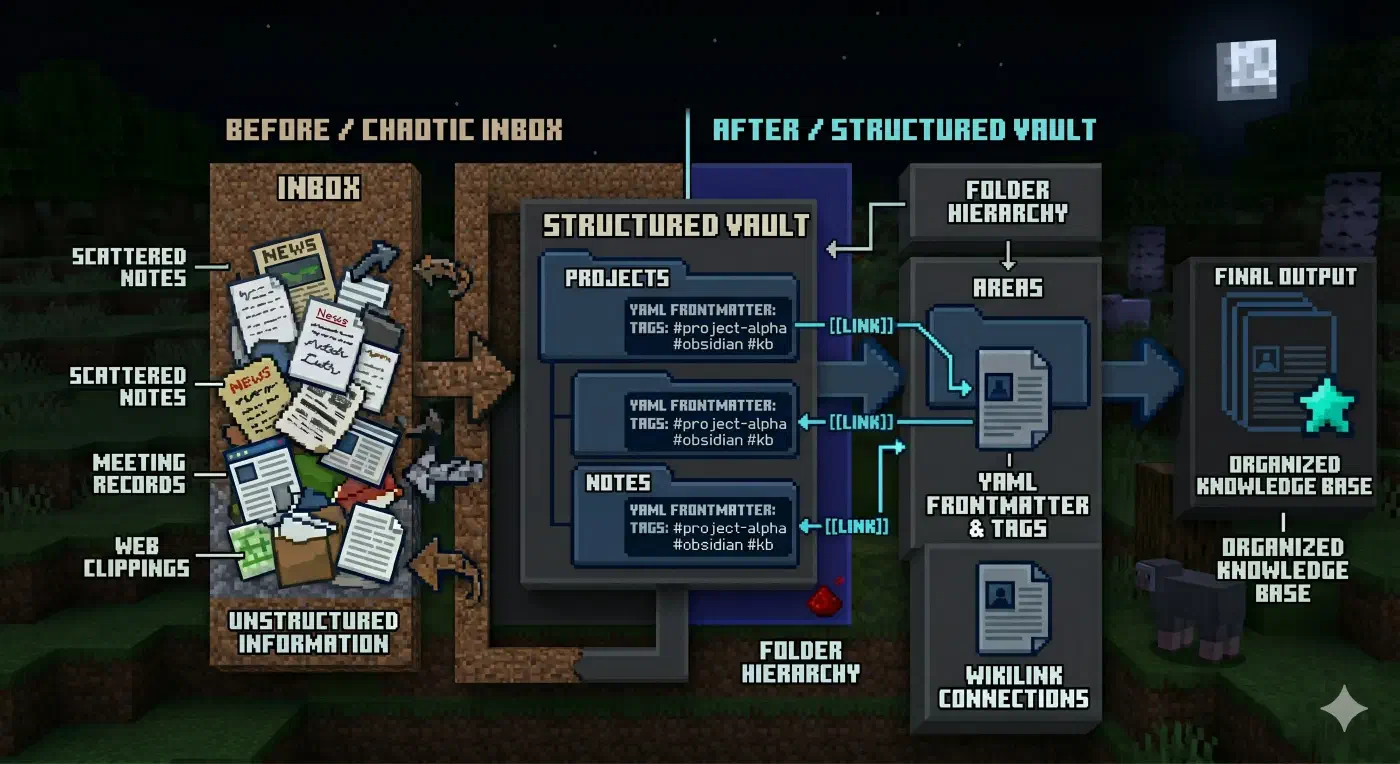
I use Obsidian to capture everything I learn: meeting notes, article clippings, things I am exploring. Despite having a decent organization system, it still accumulates chaos, files pile up in the inbox, notes drift from their intended home, connections between ideas fade. The pipeline solves this.
It uses a series of skills and a dedicated agent that understands how I want my vault structured. Here is the setup: I have an Inbox folder where everything lands throughout the week, clippings via the Obsidian web clipper, meeting notes, learning fragments, and notes that have not found a home yet. Once a day or on Fridays, I invoke the pipeline.
The agent reads everything in the Inbox, then decides for each item:
- Which folder does it belong in?
- Does it need a YAML frontmatter update?
- Should it link to existing notes via WikiLinks?
- Does it need to be split, merged, or rewritten for clarity?
The result is a vault that stays organized without me doing the manual sorting. I am testing this workflow with OpenCode right now, and it handles the task exceptionally well. The agent knows my folder conventions, understands my tagging style, and has enough context to make sensible placement decisions.
The pipeline stages, broken down:
- Trigger: Daily or weekly, manually invoked
- Input: Everything sitting in the Obsidian Inbox folder
- Stage 1: Claude reads each file, understands its content
- Stage 2: For each file, decide destination folder, update frontmatter, create WikiLinks to related notes
- Stage 3: Move files to their correct locations, clean up Inbox
- Output: Organized vault with no orphaned notes
5. The Common Pattern Across All Pipelines
If you look at all three pipelines, job search, content curation, and knowledge management, they share the same structure:
- Something triggers the pipeline (cron, webhook, manual invoke)
- Data comes in (CSV, X feed, Inbox folder)
- AI processes each item (evaluates, scores, rewrites, categorizes)
- Human reviews the outputs (the judgment call that AI cannot reliably make)
- Final output is generated and delivered (PDF, post, organized files)
Every pipeline has a human in the loop at the review stage. This is intentional. AI handles the mechanical work, sorting, scoring, rewriting, structuring. You handle the creative and strategic judgment, what deserves to be posted, which job is actually worth applying to, whether a note belongs in Projects or Areas.
[!important] The key insight: pipelines work best on processes that are stable and repeatable. If your workflow changes every week, a pipeline will cost more to maintain than it saves. Find the invariant first.
6. Finding Your Own Pipelines
Where do you find pipeline opportunities in your own work? Look for anything that follows this pattern:
- A recurring task with a defined input format that produces a defined output
- Steps that are consistent week over week even if the specific data changes
- Mechanical work that takes more time than it should: sorting, classifying, summarizing, drafting
- A volume problem: too much data to process manually (hundreds of job listings, dozens of notes, thousands of source articles)
Some obvious candidates:
- Marketing: content ideation, drafting, editing, scheduling
- Development: spec, code, review, deploy
- Research: collection, validation, analysis, synthesis
- Knowledge management: capture, categorization, linking, retrieval
The question to ask yourself: what process do I run repeatedly that eats time I could spend on higher-value work? That is your pipeline.
7. The Caveat: AI Still Hallucinates
One non-negotiable rule: you have to review everything AI produces. The pipeline handles the heavy lifting, filtering, ranking, structuring, but the final judgment call is yours. AI is exceptional at finding patterns you might have missed, surfacing connections across hundreds of data points, and flagging things that deserve a second look. But it will also confidently tell you something wrong with the same tone it uses for facts.
The most concrete example: the pipeline once tried to submit my application to the same job twice on the same day. I caught it before it went out, but it was a good reminder that AI will optimize for the stated goal (applying to everything possible) without awareness of practical constraints like “do not double-apply to the same role.” Review is not a safety net. It is a required stage in every pipeline.
The pipeline’s job is to save you time on the mechanical work. Your job is to catch the errors before they go public.
What’s Next
AI pipelines are not magic. They are just systems thinking applied to AI-assisted workflows. The ROI compounds when you find a process that is stable enough to automate but complex enough that manual execution burns time you could spend on higher-value work.
I teach product designers, UX designers, and similar roles how to build these pipelines from scratch and how to do vibe coding at zero. If you need hands-on guidance or mentoring on any of this, write to me at hola@fernandoux.com.
The future belongs to people who build systems, not people who run on a treadmill.